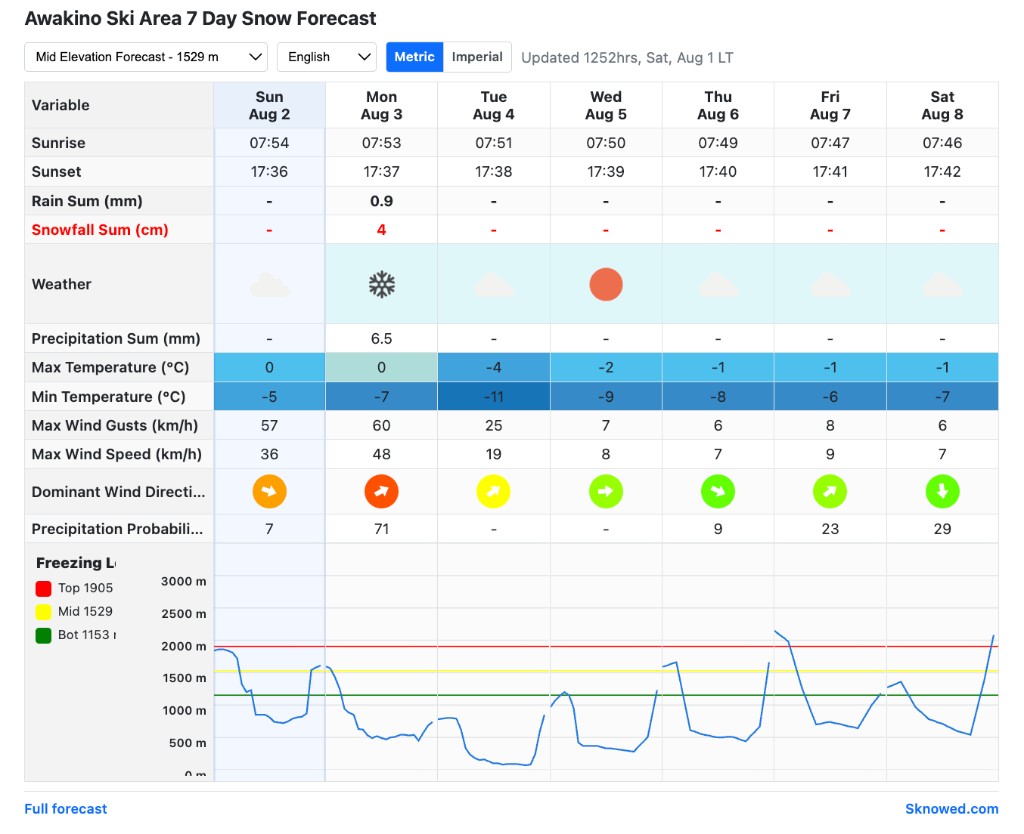
How it works
- Create a free account (or sign in).
- Open Account → Free Snow Widget and generate an embed for a resort + your website domain.
- Copy the embed code and paste it into your site’s HTML (or a “Custom HTML” block).
- Preview live in your account — use the on-page preview to try forecast rows, scrollbar, and condensed width before (or after) you paste the code.
- Change variables or layout later in your account — the same code updates automatically.
Create your widget
After sign-in, go to Sknowed.com Account · Free Snow Widget. You can create up to 5 widgets (one resort each).
Live preview in your account
Your Free Snow Widget manager includes a live iframe preview for each embed. Toggle variables, fixed height / scrollbar, and condensed width, then watch the preview update before you copy the code onto your website. Visitors can still change elevation, language, and units on the live widget itself.
Settings explained
1. Resort
Search and pick the ski resort whose 7-day forecast you want to show. Each account may have only one widget per resort.
2. Website domain
Enter the site that is allowed to display the widget (for example
myskihotel.com). Only that domain can embed the code —
www and the apex domain count as the same site. This lock
stops other websites from using your code.
3. Forecast variables
Choose which rows appear in the table. You can select all, clear, then tick what you need. Available options:
- Sunrise
- Sunset
- Rain Sum
- Snowfall Sum
- Weather
- Precipitation Sum
- Max Temperature
- Min Temperature
- Max Wind Gusts
- Max Wind Speed
- Dominant Wind Direction
- Precipitation Probability
- Freezing Level
4. Fixed height & vertical scrollbar
Off (default): the iframe grows to the full height of the table — no vertical scrollbar inside the widget.
On: the frame is about half the full table height with an internal scrollbar — useful when space is tight.
5. Condensed fixed-width table
Off: day columns expand evenly to the width of the iframe (best for full-width page sections).
On: a compact table sized to the content — easier to fit in a narrow column or sidebar.
6. Save settings
After your first code is created, edit variables and layout anytime and click Save settings. Sites that already have your embed code pick up the new choices automatically — you do not need to re-paste the snippet.
7. Terms of Service
Using the widget means you agree to our Terms of Service, including domain locking and leaving Sknowed.com attribution intact.
Controls visitors see on your site
These live on the widget itself (not in your account form). Visitors can change them without affecting other people.
- Elevation — bottom, mid, or top of resort forecast.
- Language — follows the visitor’s browser language when possible (English, 日本語, 한국어, 中文), otherwise English. They can also switch language in the dropdown.
- Metric / Imperial — unit system for temperatures, snow, wind, and elevations.
Paste the embed code
Each widget has a short HTML snippet: a placeholder
<div> plus an async
<script> loader (similar to common weather widgets).
Use Copy embed code in your account, then paste into your page.
Reciprocal link offer
This is a simple trade: you show the Free Snow Widget on your site (and keep the Sknowed.com attribution / link in the widget footer), and we list a free reciprocal link back to your website on our Partners directory.
What you get
- A named listing on sknowed.com/partners (by category).
- A clickable link to your site — useful for guests, SEO, and discovery.
- No listing fee when the widget is live with attribution intact.
What we ask
- The Free Snow Widget is embedded on your live domain.
- The Sknowed credit / link under the widget stays visible (do not remove or hide it).
- Your listing details are accurate and suitable for a public partners page.
How to claim the offer:
- Create an embed and paste it on your live website.
- In Account → Free Snow Widget, open Request free listing for that embed.
- Choose your website category, display name, short blurb, and URL, then submit for review.
- After approval, your reciprocal link appears on the Partners page, grouped by category.
Listings are reviewed before they go live. Editing an approved listing and resubmitting removes it from the public page until it is reapproved.
Tips & limits
- Up to 5 widgets per account.
- One widget per resort per account.
- The widget only loads on the domain you configured.
- Preview in your account uses owner preview access; public sites need a matching domain.
- Keep the Sknowed.com link / attribution in the footer of the widget (required for the reciprocal Partners listing).
- Forecasts are for information and planning — always check local conditions.
Ready to add it?
Create your free snow widget in a few minutes.
Sign up freeAlready have an account? Sign in then open Account → Free Snow Widget.